Wurding: a docked lexical reference for precise word choice
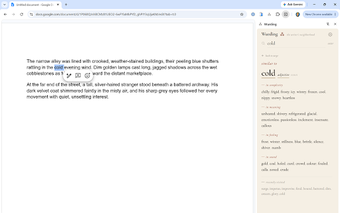
Wurding, by Kamal Murray Farmer, is a Chrome extension that acts as a reference companion for serious writers. It exposes a five-axis neighborhood for any highlighted word, listing meaning, sound, root, type, and feeling inside the Chrome Side Panel so writers can explore precise alternatives without leaving their draft. The extension provides instant lookups and a bundled dictionary and integrates with web editors like Google Docs, Notion, and Medium. It targets authors, poets, students, and non-native speakers who need precise word choice and expressive nuance when drafting.
What Wurding is built to do for writers
Wurding is a focused, non-generative lexical reference that helps users locate precise alternatives and related terms. It organizes word neighbourhoods across five axes, presented as Meaning, Sound, Root, Type, and Feeling. The interface emphasizes exploration over automatic rewriting, and the extension does not produce prose on the user’s behalf, so it supports deliberate word selection rather than assisted composition.
How fast lookups behave and why they feel instant
The extension performs instant lookups with reported sub-100 millisecond response times, aided by a bundled dictionary stored locally. Because the data is included in the add-on, queries return quickly for single-word selections, avoiding network roundtrips that can slow contextual searches. This design produces near-zero latency when you highlight or double-click a word, so lookups interrupt a writing session minimally.
How Wurding handles privacy and local data
Wurding adopts a privacy-first model, operating entirely offline and making no external server calls. The extension does not track user queries or transmit writing to third parties, so lookups remain on the local machine. That local-only approach limits data exposure by design and matches the developer’s stated commitment to keeping word lookups and writing private.
How it fits into web-based editors and Chromium workflows
The extension integrates into the Chrome Side Panel using the Side Panel API, keeping the interface docked and out of the main editor space. Activation happens via highlight or double-click, which spawns a small on-page button that opens the panel. It lists compatibility with web editors such as Google Docs, Notion, and Medium, and it is available for other Chromium-based browsers that support the side panel mechanism.
A focused tool showing early promise for vocabulary-focused writers
Wurding suits writers who prefer a local, reference-style approach to word choice; early-release feedback from the writing community has been positive. Try it alongside the web editor you use most to see how selection-triggered lookups fit your drafting rhythm. Expect incremental updates during the early release phase as the extension evolves in response to user input and testing.